
I benchmarked my Rust file search engine against Everything until I ran out of excuses
Robert Nio · June 2026 · UltraFastFileSearch (UFFS) · Sky, LLC
Windows file search has been bad for so long that most people have stopped being angry about it. They just open Explorer, type a name, watch the green progress bar crawl, and accept it the way you accept weather.
You know the ritual, because everybody's ritual is the same. You know roughly what the file is called, so you type a partial name and hope. When that fails you sort Downloads by date and scroll. When the drive fills up you go hunting for the big files. And every so often you stare at a search result that you know is wrong, because the file exists, you put it there, and the index just didn't feel like telling you. I did all of that for years, on a workstation that makes the problem about as bad as it gets: seven NTFS volumes, NVMe next to old spinning rust, about 23 million files, and the file I want is reliably on the drive I didn't think to search.
So I built a search engine that reads the NTFS Master File Table directly. This post is about what happened when I benchmarked it properly against the best tool in the category, and about everything I had to fix in my own methodology before I was willing to publish the results.
The short version: my engine, UFFS, wins all 30 measured head to head cells against Everything at p50, with a median ratio of about 0.36x, call it 2.8x faster on the median interactive query. The longer version is more interesting, because it includes a statistical tie I couldn't break for two releases, a bulk-export workload where my competitor's CLI hit a ~2 GB IPC limit at this scale, two regressions in my own engine that I publish anyway, and the list of scenarios where Everything is still the tool you should use.
If you only trust raw data, skip the prose. The CSVs, the harness scripts, and the methodology are all in the repo. Run just bench-suite on your own machine and tell me where I'm wrong. I mean that literally, the most useful feedback I've gotten so far came from people trying to break the numbers.
Some context, and a confession
First confession: I'm one of those people for whom Everything is among the first things installed on a fresh Windows box. It earned that. Which is exactly why "just feels faster" wasn't going to cut it when I started claiming my own tool beat it. If you're going to benchmark against the tool the whole community treats as the reference, you'd better show your work.
Second confession: UFFS started life as a C++ tool. It worked, in the sense that it produced correct results, and it was fast in the sense that re-reading the entire Master File Table on every single invocation can be called fast if you never measure anything. I eventually rewrote it in Rust, with a resident daemon, a compact persisted index, and a parser that doesn't allocate per record.
I keep the old C++ binary around and benchmark against it every release, partly for honesty and partly, I admit, because it's satisfying. The current numbers: the C++ tool is 182x slower on an exact name lookup on C:, 2,038x slower on a rare extension search on D:, and 3,447x slower on a regex alternation. On the combined four drive regex cell it did not finish before the harness's 120 second timeout. That's not a dig at C++ the language. It's the cost of an architecture that throws away its index after every query. The lesson was boring and old: the fastest code is the code that doesn't rerun.
Why "is it fast" is the wrong question
Here's the thing that took me embarrassingly long to internalize: there is no such thing as one file search speed. There are at least four.
Cold: first index build from raw disk. Warm: restart from a persisted index. Hot: query against a resident index. Bulk: stream the whole result set out. Tools make different tradeoffs across these four, and every "X is faster than Y" claim you've ever read silently picked the one where X looks good. Everything's whole design is optimized to make hot interactive lookups feel instant, and it does that very well. If you benchmark only that, on one laptop drive, with a 50 row result set, you'll conclude there's nothing left to build. I benchmarked wider than that, and the picture changed.
So the harness measures all of it, with rules that are deliberately boring: both tools fully warm, same drives, same patterns, same output sink, run back to back in randomized order on the same OS page cache state, ten rounds per cell, p50 and p95 both reported. Everything runs in its own isolated instance scoped to exactly the drives under test, driven through its official es.exe CLI. And every cell reports row counts for both tools, because a latency comparison where one tool returned 30 rows and the other returned 30,000 is not a comparison, it's a rigged demo. Worst observed row drift across the whole run: 3 rows, on live filesystems with 12.8 million file records.
The numbers
Test machine: Ryzen 9 3900XT, 64 GB, Windows 11 Pro 24H2. Four NTFS volumes (two NVMe, one HDD, one removable), 12,815,626 live file records. UFFS v0.5.120 against Everything 1.4.1.1032 via es.exe 1.1.0.30. Six pattern classes: exact name, prefix, rare extension, common extension (*.dll), regex alternation, substring.
UFFS wins all 30 cells at p50. A few representative ones:
| Workload | UFFS | Everything | Ratio |
|---|---|---|---|
| C: exact name | 20 ms | 69 ms | 0.29x |
| C: *.dll (166,684 rows) | 96 ms | 237 ms | 0.41x |
| C: substring (25,320 rows) | 39 ms | 105 ms | 0.37x |
| All four drives, *.dll (363,797 rows) | 181 ms | 456 ms | 0.40x |
| All four drives, substring | 69 ms | 154 ms | 0.45x |
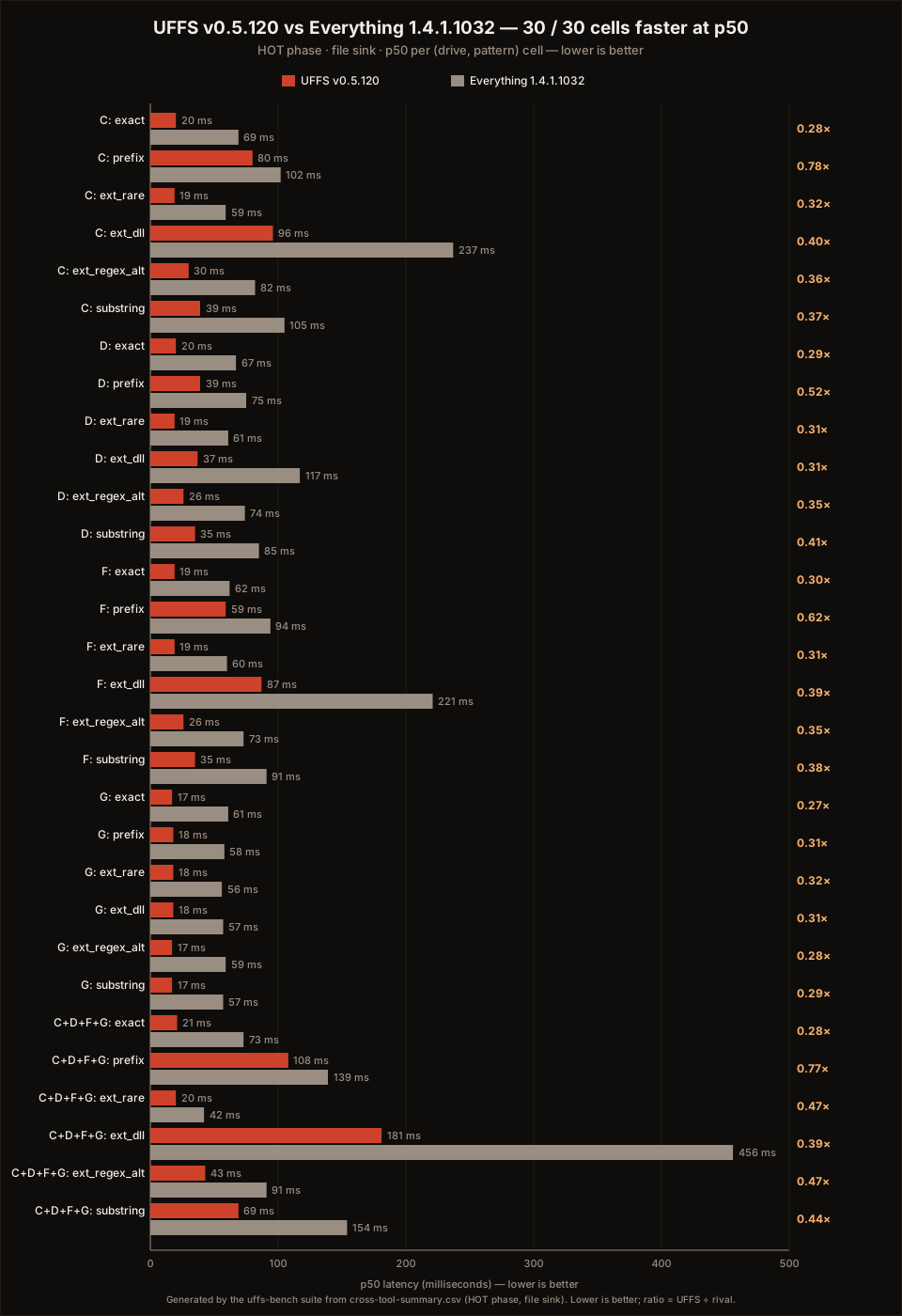
Median across all 30 cells: 0.36x. Two caveats before you write the comment, because I'd write it too.
First: six of those 30 cells run on a nearly empty 16 GB removable volume where every pattern returns zero matches. Those cells measure pure dispatch overhead, both tools sit under 62 ms, and I report them for completeness, not as wins worth bragging about. Exclude them and the median is 0.38x. The conclusion doesn't move.
Second: the p95 spikes on the tiny result cells (72 to 131 ms against 20 ms medians) are CLI process spawn, not query cost. The harness launches a fresh uffs.exe every round because that's what a script would do. Daemon side, those queries are low single digit milliseconds. I report the end to end number anyway because that's what you actually experience at a shell.
The cell I'm proudest of is the least impressive looking one. C: prefix search was a statistical tie in every previous snapshot, 99 ms against 97 ms in April, and it ate more profiling time than any other line in that table. In v0.5.120 it's 80 ms against 102 ms. Not a glamorous ratio. It was the last tie on the board, and it's gone. Against our own April snapshot, all 12 previously published cells got faster, median 33% better, while Everything's numbers on the same cells drifted between minus 5 and plus 8 percent.
The workload the other tool doesn't run
There's one comparison in the report that is deliberately one sided, and I want to be straight about why. Bulk export: dump every file record on the machine to CSV. Everything's es.exe aborts near its roughly 2 GB IPC export ceiling on this workload, so the harness can't measure it. That's a real architectural limit of its CLI path, but it's also a workload Everything was never designed around, so read this section as "what UFFS does" rather than "what Everything loses."
UFFS streams the complete estate, all seven volumes, 23,322,046 rows, to CSV in 12.0 seconds. That's a sustained 1.95 million records per second out of the daemon, through the query engine, onto disk. It's also 12% faster than the same export in April, which matters to me more than the absolute number, because trend lines are harder to cherry pick than snapshots.
This is the workload I actually built UFFS for. Not "find one file fast", which was solved, but "treat 23 million file records as a queryable dataset". Filter by size and age across every drive at once, aggregate, export, script against it, feed it to other tools.
What I am not claiming, and what I publish that's ugly
I'm not claiming "fastest file search on Windows." Nobody should claim that, the phrase is meaningless without a workload attached. Everything fully warm on a single laptop drive doing type and see desktop lookups is excellent, and on some of those scenarios, which my harness does not measure, it is probably still ahead. If that's your whole use case, Everything is free, mature, and you should keep using it. UFFS earns its keep when the words huge, multi drive, scripted, structured, or agent accessible describe your problem.
The benchmark hub also carries a section most marketing departments would veto: known regressions. Right now it lists two. An unbounded full scan with a top 100 limit regressed badly during a sort rewrite, 163 ms to over a second, and --sort path on a 167,000 row drive regressed to 221 ms from a projected 60. Both are root caused, both have fixes tracked, and both are in the published report with raw logs. Anyone who upgrades and hits them would notice anyway. A benchmark report that hides the cells its author doesn't like is a report nobody should trust twice, and I'd rather lose a headline than the benefit of the doubt.
While I'm listing the unflattering parts: UFFS is Windows only, because the MFT is. It needs Administrator to read the volume handle, that's an NTFS rule, not my choice. The binaries aren't code signed yet (the certificate is literally the first line item the project's sponsorships fund), so SmartScreen will give you the scary dialog. And it's a young codebase moving fast. You should know all of that before you type the install command.
Why it's fast, briefly
No magic, just refusing to do work twice. UFFS reads the raw MFT once per index build, in parallel, with a per record parser that does zero heap allocations and writes straight into column oriented storage instead of building a vector of structs and converting later. The index persists, so restarts are cheap. A resident daemon keeps it queryable, so the hot path never touches the disk layout at all. Queries compile to operations over columnar data rather than walking a tree of paths.
Rust deserves a sentence here, but only one, because language evangelism is tedious. What Rust bought me wasn't speed, C++ compiles to the same instructions. It bought me the confidence to make the whole pipeline aggressively parallel and then keep refactoring it across fifty odd point releases in two months without the category of 3 a.m. memory bugs that made me afraid to touch the old codebase. The strictest lint set Clippy offers is turned on and treated as errors. The compiler is the code reviewer who never gets tired.
One more thing, mentioned last on purpose because it's the multiplier and not the product: the same daemon speaks MCP, so AI agents can query the index with structured filters instead of stumbling through directory listings one level at a time. Sub second answers over 23 million records turn out to be what makes "ask your computer where the file is" actually work as a conversation. But that only matters because the engine underneath is real, which is what the rest of this post was about.
Try it, or better, try to break it
Install: winget install SkyLLC.UFFS, or grab a binary from the releases page, checksums and SBOMs included. The repo has the full benchmark report, the methodology doc, the raw CSVs, and the harness. If your numbers disagree with mine, open an issue with your hardware and I'll take it seriously. The fastest way to keep a benchmark honest is to let strangers run it.